adop.tools

Partner guide

GA4 and Clearly: Where Cross-Platform Reporting Picks Up

GA4 tells you what happened on your site. Clearly sits next to it and pulls ad spend, search and site data into one report that explains the month in plain English.

GA4 · 5 min read

Disclosure: Clearly is a partner of adop.tools. This guide was written with input from the Clearly team, and links to clearly.report carry a referral tag so they can see visits from this site.

Google Analytics 4 is the right place to measure what visitors do on your site: events, key events, sessions and the path to a purchase. Most teams do not stop there. A monthly report also has to cover what was spent in Google Ads, Meta and LinkedIn, what search is doing, and whether the two sides agree. That cross-platform view is the gap Clearly is built to fill, and it is designed to sit alongside GA4, not replace it.

What GA4 does well

GA4 owns the measurement layer. Its event model, key events, the standard reports and Explorations and the BigQuery export are the source of truth for on-site behaviour. If the numbers in GA4 are wrong, every report built on them is wrong, which is why the 30-minute health check comes before any reporting layer.

Where GA4 reports stop

What Clearly adds

Clearly connects the sources a marketing report draws on: Google Analytics, Google Sheets and BigQuery for your own data, Google Ads, Search Console, Business Profile and Merchant Center for search, and Meta, LinkedIn and Reddit for paid social. It opens each report with a one-sentence headline in plain English, shows the change against the prior period or the prior year, and adds a short line on what is driving the movement.
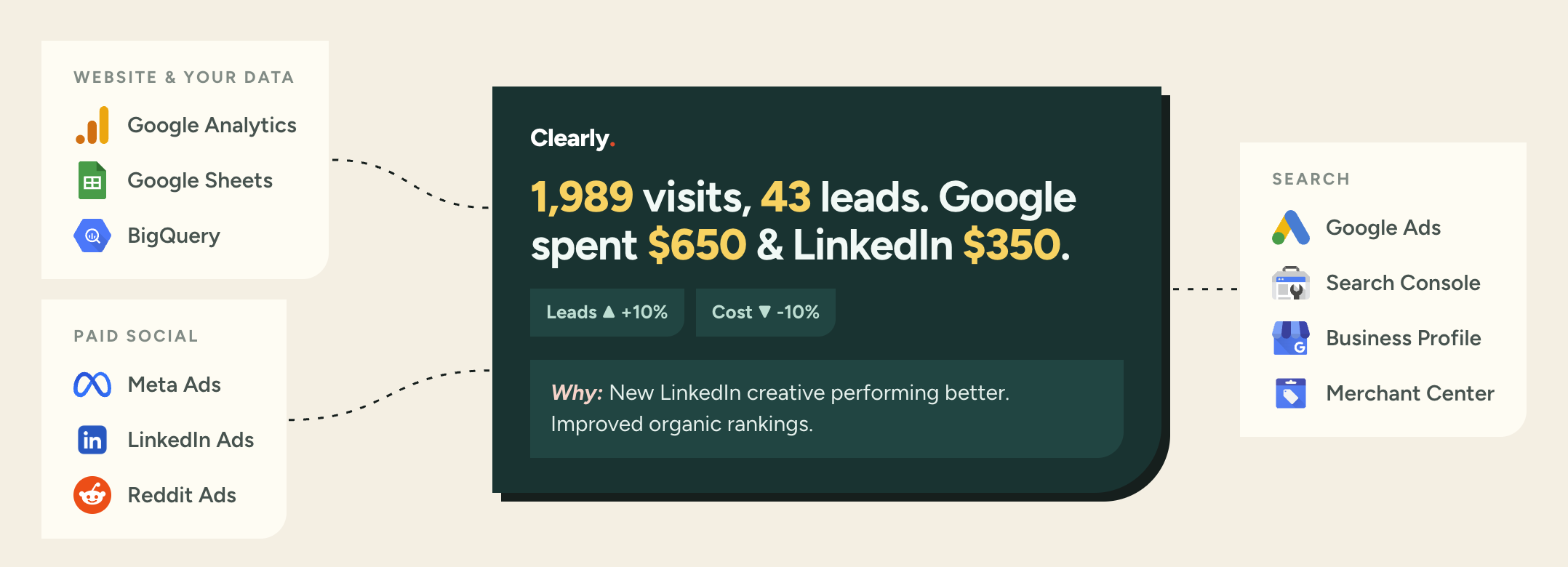
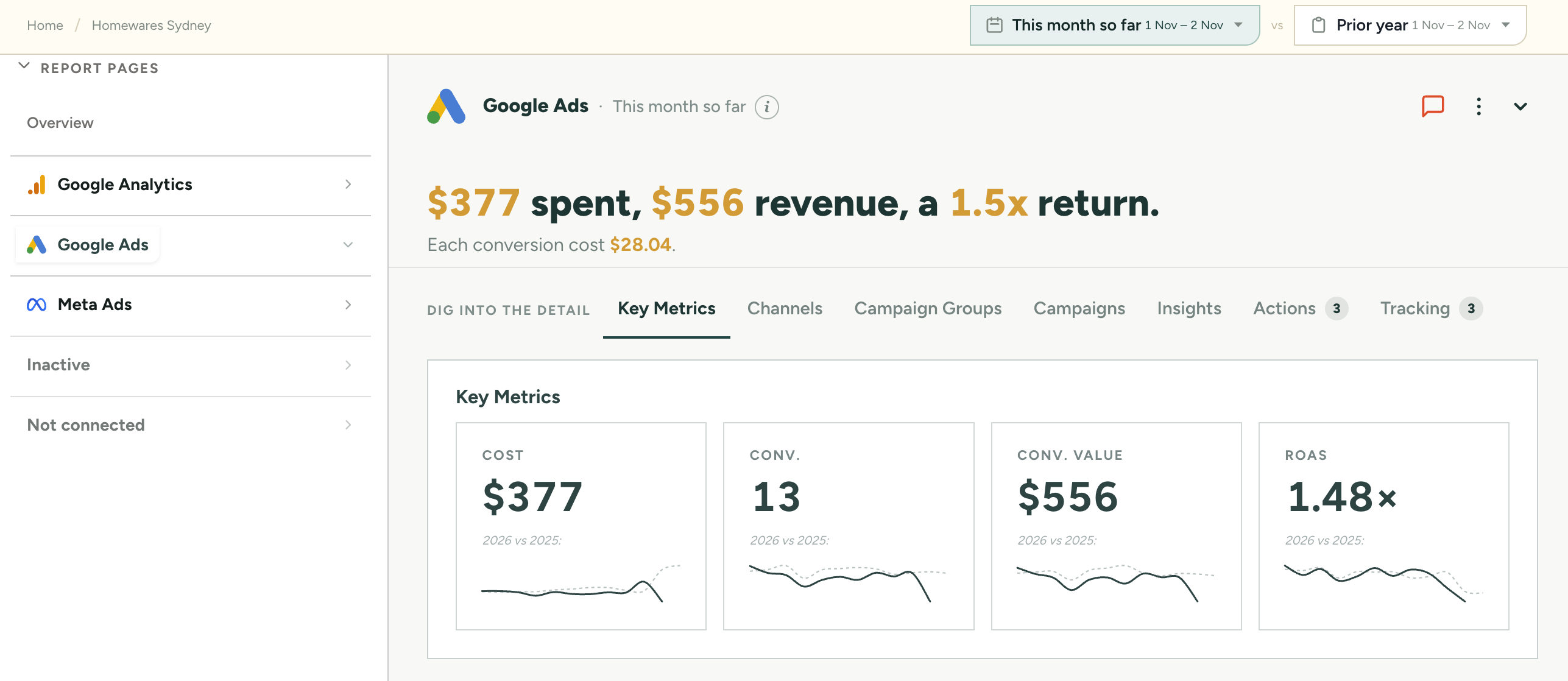
Diagram of Clearly connecting Google Analytics, Google Sheets, BigQuery, Meta Ads, LinkedIn Ads, Reddit Ads, Google Ads, Search Console, Business Profile and Merchant Center into one summary: visits, leads, spend per platform, change versus the prior period and a short reason why.
Several sources, one answer: the headline, the change, and a short explanation of what moved. Image: Clearly.

One report page per platform

Each connected platform gets its own page, with the same structure underneath: Key Metrics, Channels, Campaign Groups and Campaigns for the numbers, then Insights, Actions and Tracking for what to look at next. The Google Ads page below leads with spend, revenue and return, then shows the four numbers that matter against the same period last year.

Clearly Google Ads report page showing a plain-English headline of spend, revenue and return, with Key Metrics cards for cost, conversions, conversion value and ROAS compared with the prior year, and tabs for Channels, Campaign Groups, Campaigns, Insights, Actions and Tracking.
A platform page: headline first, then Key Metrics against the prior year, with the detail tabs underneath. Image: Clearly.

GA4 data, read through the same lens

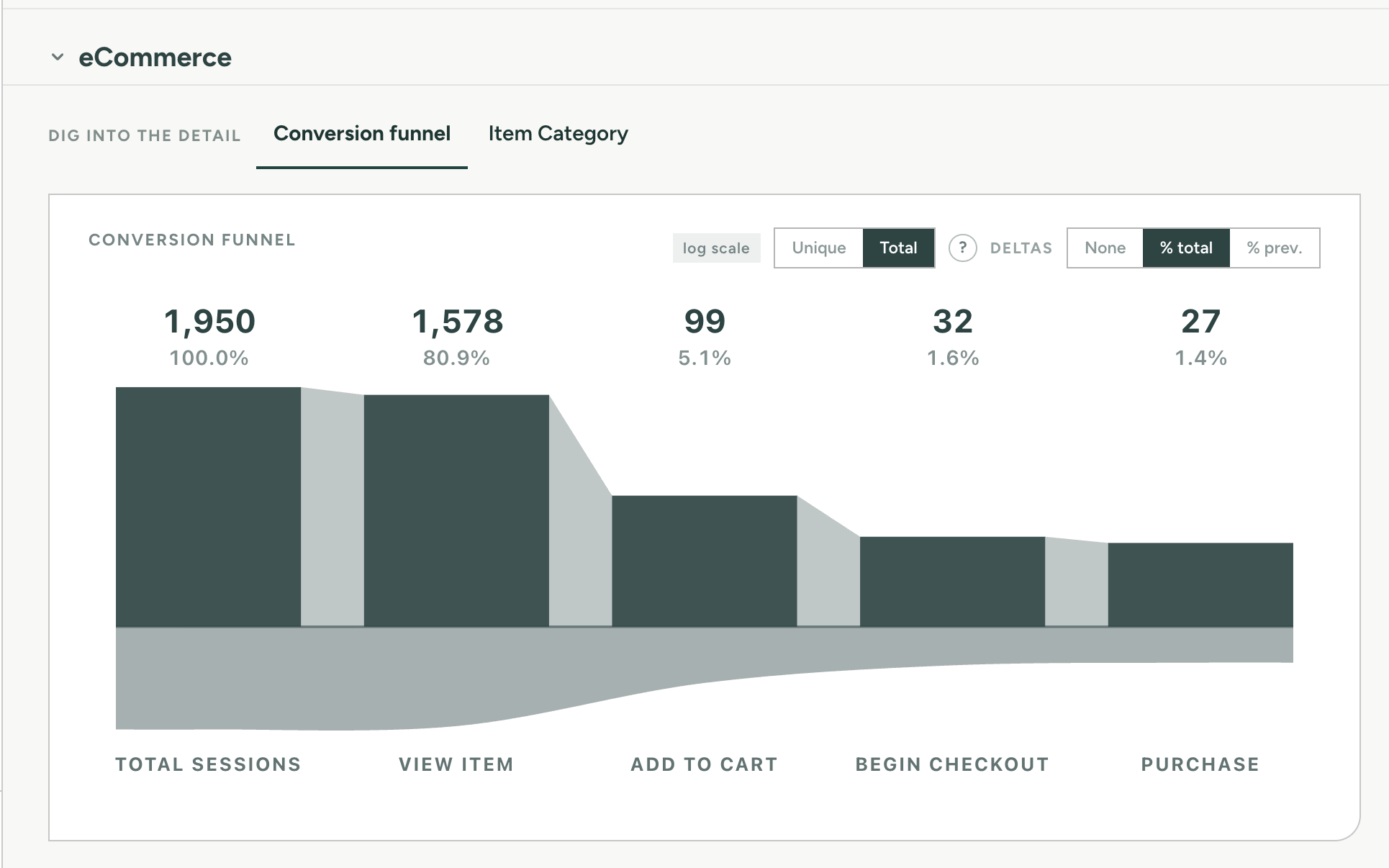
The Google Analytics page works the same way. The eCommerce view below rebuilds the GA4 conversion funnel from sessions through to purchase, with unique and total counts and the drop at each step as a share of the total or of the previous step. It is the same data you would build in a GA4 funnel exploration, laid out next to the ad platform pages so the two can be read together.

Clearly eCommerce conversion funnel built from GA4 data: total sessions, view item, add to cart, begin checkout and purchase, with a unique or total toggle and delta options.
The GA4 eCommerce funnel, with controls for unique or total counts and for how the drop-offs are shown. Image: Clearly.

When to use which

QuestionBest tool
Why did this page or event behave oddly?GA4 (DebugView, Explorations)
Is the tracking itself set up correctly?GA4 and the health check
What did we spend and get across every channel this month?Clearly
How do I explain the month to a client or manager?Clearly
Custom analysis on raw event data?GA4 BigQuery export

Get the foundations right first

A reporting layer is only as good as the data under it. Before you connect anything, check that GA4 is collecting what you think it is. You can work through the health check by hand, or run the free GA4 audit for the automated version. If Google Ads is a big part of the budget, Clearly also offers a free Google Ads audit.

Related guides

All guides →